Adding a domain returns three records. Only the first is required, and the reason the other two are worded carefully is that a naive version of them can break mail you already send.
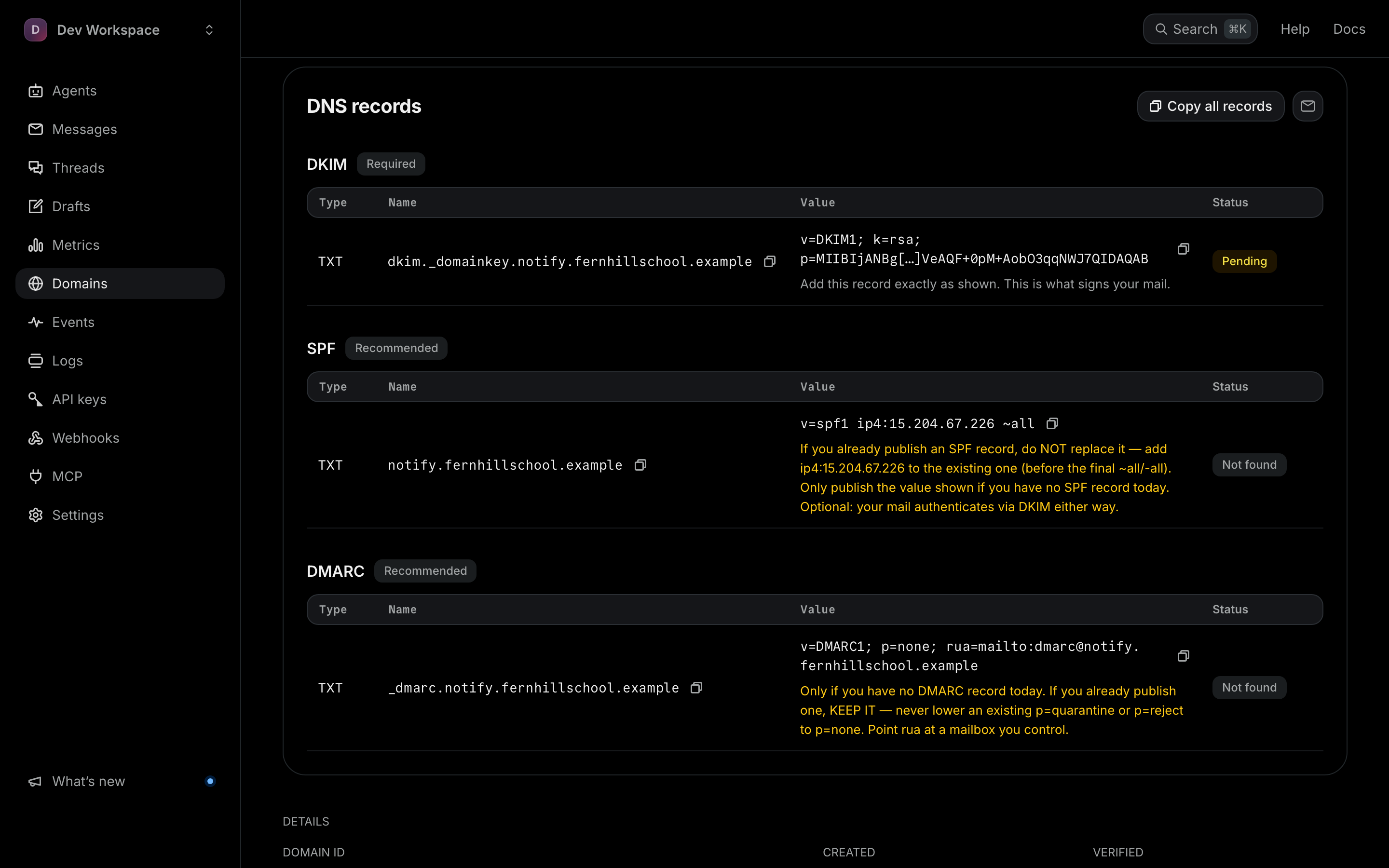
A TXT record carrying a public key generated for your domain alone. This is what actually authenticates your mail: our envelope sender is always our own bounce domain, so DMARC aligns through DKIM, not SPF. Publish this one and you are done.
If you already publish SPF (and with Google Workspace or Microsoft 365 you do), adding a second v=spf1 record at your apex breaks your existing mail. So the SPF row comes with a merge instruction and a merge_token: the one ip4: entry to add to the record you already have, before its final ~all or -all. Publish the full value shown only if you have no SPF record at all. SPF is optional either way, because your mail authenticates through DKIM.
We suggest a DMARC policy and we point rua at your address, not ours. A vendor that hands you p=none; rua=mailto:vendor.com has quietly downgraded your policy and taken your reports. If you already publish DMARC, leave it exactly as it is.
Add your domainThe rule behind all three: a record we ask you to publish must never be able to damage mail that has nothing to do with us.